Setting up your first podcast studio

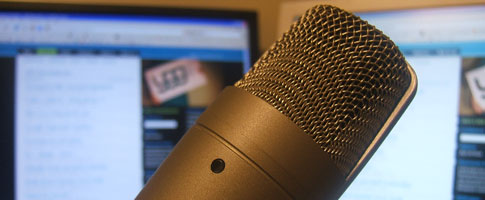
Microphone

Each generation of technology seems to enable us to edge closer to using what the pros do for a smidgen of the cost. What used to require an Avid studio and monstrous computers ($$$$$) can now be done in Final Cut Pro on a Macbook ($$). Same for audio as well.

If you’re like me, you probably bought a headphone/microphone combo at some point to upgrade from the dollar store mic included with most computers. Today, I want to take a look at a kit that’s several levels above that, and won’t set you back too much.

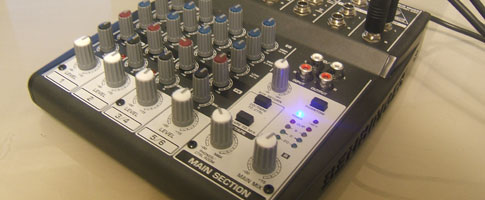
This kit is the Behringer Podcastudio (firewire), which I purchased a couple weeks ago. I figured an audio review of the studio would allow you to hear it for yourself and save me over an hour’s worth of typing.

This review is an intro for anybody looking to get into podcasting, personal recording, or uses voip on a frequent basis. As much as it’s a review, I cover all the essential elements you’ll need to setup your own cost effective recording studio.

I mention a couple of accessories in my review that are a must for any podcasters or voip-a-holics. One of which is a “pop filter“. I’ve yet to receive mine from eBay, so please excuse the plosives (louder Ps and Bs).

You can find the Behringer Podcastudio (firewire) at American Musical Supply, where I purchased it, and Musician’s Friend (coming soon).

If you have any questions about podcasting, need help deciding on a kit or setting one up, send me an e-mail and I’ll try and provide some tips (travis {at} younggogetter {dot} com).

Here’s my review, and a few pictures of the kit:

[audio:http://www.younggogetter.com/interviews/podcastudio_review.mp3]

Here’s the mp3 if you can’t see the audio player.
Mixer

  • http://www.willmayo.com Will

    Great review, cheers for the tips!

  • http://www.willmayo.com Will

    Great review, cheers for the tips!

  • http://www.younggogetter.com/ Eric

    Nice work Travis. I think I might have some old studio equipment lying around. Your recording sounded great though, and the plosives were minimal even w/out the pop filter.

  • http://www.younggogetter.com/ Eric

    Nice work Travis. I think I might have some old studio equipment lying around. Your recording sounded great though, and the plosives were minimal even w/out the pop filter.

  • http://www.kmull.com/ Kevin

    Really neat review. I won’t be getting into podcasting any time soon, but interesting to see how the tech has progressed.

  • http://www.kmull.com/ Kevin

    Really neat review. I won’t be getting into podcasting any time soon, but interesting to see how the tech has progressed.

  • http://smartwealthyrich.com Jonathan-C. Phillips

    umm, i have my own recording studio.. .how come i haven’t started recording podcasts… think this is just what i needed, i little boost :)

  • http://smartwealthyrich.com Jonathan-C. Phillips

    umm, i have my own recording studio.. .how come i haven’t started recording podcasts… think this is just what i needed, i little boost :)

  • http://imrebmolnar.spaces.live.com Imre

    what software would you suggest for pc?

  • http://imrebmolnar.spaces.live.com Imre

    what software would you suggest for pc?

  • Pingback: Apple’s video guide to producing a successful podcast -- Young Go Getter

  • http://http://www.europealacarte.co.uk/blog Karen Bryan

    I do agree that it is amazing to be able to produce the equivalent of a radio broadcast sitting at you computer. I was lucky enough to win a Pinnacle Podcast Factory in a competition on a French TV news channel. I am not very technically minded and although I’d been thinking about doing podcasts for my European travel blog, I was a bit apprehensive about podcasting. I had to call my son, a computing student and my IT consultant to set up the system. I managed to record and upload a podcast today on my own. I think that the sound quality is pretty good and now it’s all set up it’s easy to use. So now any business can talk directly to its potential customers.

  • rob

    hey I’ve bought this studio recording system, as i would like to record my guitar and stuff. but when i look at the instruction I’m and totally lost about connecting the cable and mixer to the interface. will you please help me by giving me instruction on how to install/assemble it properly.
    much thanks
    rob

  • rob

    hey I’ve bought this studio recording system, as i would like to record my guitar and stuff. but when i look at the instruction I’m and totally lost about connecting the cable and mixer to the interface. will you please help me by giving me instruction on how to install/assemble it properly.
    much thanks
    rob

  • http://www.craigritchie.com Craig Ritchie

    Mitch Joel of Twist Image (www.twistimage.com/blog) is a great podcaster, and recommends 1) a logitech headset; 2) CastBlaster; and 3) Audacity. Cheaper? Simpler? Maybe for first-timers. Just thought I’d throw that out there. I haven’t started podcasting… but soon. ish.

  • http://www.craigritchie.com Craig Ritchie

    Mitch Joel of Twist Image (www.twistimage.com/blog) is a great podcaster, and recommends 1) a logitech headset; 2) CastBlaster; and 3) Audacity. Cheaper? Simpler? Maybe for first-timers. Just thought I’d throw that out there. I haven’t started podcasting… but soon. ish.

  • James

    Thanks for the review — I searched long and hard for one on this package. The description of the kit specifies a microphone windscreen as included. Is this not the same as a pop filter?

  • James

    Thanks for the review — I searched long and hard for one on this package. The description of the kit specifies a microphone windscreen as included. Is this not the same as a pop filter?

  • http://www.younggogetter.com/ Travis

    James,
    The type of windscreen included is this:

    Its size and thickness not only kills the plosives, but also a bit of energy in your voice.

    The pop filter doesn’t flatten your sound and still catches the plosives:

    Good ones range anywhere from about $20-$50 and are worth the investment.

  • http://www.younggogetter.com/ Travis

    James,
    The type of windscreen included is this:

    Its size and thickness not only kills the plosives, but also a bit of energy in your voice.

    The pop filter doesn’t flatten your sound and still catches the plosives:

    Good ones range anywhere from about $20-$50 and are worth the investment.

  • James

    Thanks for the response. I’ve played with many USB audio devices with my Mac but not firewire ones. Does it interface a cleanly as a USB device? Will I have any trouble connecting this to GarageBand for example?

    Thanks!

    James

  • James

    Thanks for the response. I’ve played with many USB audio devices with my Mac but not firewire ones. Does it interface a cleanly as a USB device? Will I have any trouble connecting this to GarageBand for example?

    Thanks!

    James

  • James

    Thanks for clearing up the windscreen/pop filter question. While I’ve used many USB audio devices, does a firewire device like this connect as easily to your Mac. For example, does it work ok with GarageBand?

  • James

    Thanks for clearing up the windscreen/pop filter question. While I’ve used many USB audio devices, does a firewire device like this connect as easily to your Mac. For example, does it work ok with GarageBand?

  • http://www.younggogetter.com/ Travis

    I haven’t had the opportunity to test the system with a Mac, but there’s no question that it would be quite a bit easier to setup and use as the Firewire kit was designed for Mac users.

    GarageBand has many elements made just for Podcasters and I hope to someday make the transition to a Mac and it. GB is the dream podcasting app and should work seamlessly with this kit.

    It may seem like there are a lot of cables and elements in this kit, but when all is said and done only one cable (firewire) is plugged into your Mac or PC. Everything else is linked through the mixer and audio interface.

    If you have one available Firewire port on your Mac you’re good to go. You don’t need the Mic or Headphone ports or a special audio card.

  • http://www.younggogetter.com/ Travis

    I haven’t had the opportunity to test the system with a Mac, but there’s no question that it would be quite a bit easier to setup and use as the Firewire kit was designed for Mac users.

    GarageBand has many elements made just for Podcasters and I hope to someday make the transition to a Mac and it. GB is the dream podcasting app and should work seamlessly with this kit.

    It may seem like there are a lot of cables and elements in this kit, but when all is said and done only one cable (firewire) is plugged into your Mac or PC. Everything else is linked through the mixer and audio interface.

    If you have one available Firewire port on your Mac you’re good to go. You don’t need the Mic or Headphone ports or a special audio card.

  • http://www.christopherrosser.com Christopher

    Great review Travis. I discovered it while researching the kit and was impressed by both the quality of your review and your frankness.

    My kit arrived a few days ago and since then I’ve hooked up to my ageing G4 Powerbook; took less than 20 minutes to get going.

    The gear works seemlessly with Mac and Garageband 08 with no drivers needed for the Firewire interface so I hope that helps anyone with Apple queries.

  • http://www.christopherrosser.com Christopher

    Great review Travis. I discovered it while researching the kit and was impressed by both the quality of your review and your frankness.

    My kit arrived a few days ago and since then I’ve hooked up to my ageing G4 Powerbook; took less than 20 minutes to get going.

    The gear works seemlessly with Mac and Garageband 08 with no drivers needed for the Firewire interface so I hope that helps anyone with Apple queries.

  • http://www.younggogetter.com Travis

    Thanks Christopher.

    We may get our podcast back up some day. But for everyday use, the podcastudio is fantastic.

    I use it several times a day to chat on Skype or make long distance phone calls. Crystal clear quality.

    Enjoy your kit and be sure to send us a link if you ever create your own show.

  • http://www.younggogetter.com Travis

    Thanks Christopher.

    We may get our podcast back up some day. But for everyday use, the podcastudio is fantastic.

    I use it several times a day to chat on Skype or make long distance phone calls. Crystal clear quality.

    Enjoy your kit and be sure to send us a link if you ever create your own show.

  • Jimmy

    Hi Travis,

    Thanks for your great, helpful review. I’m looking for a set to record some vocals at home, and I was wondering what you think of this podcasting set to record singing vocals?

    Thanks,

    Jimmy

  • Jimmy

    Hi Travis,

    Thanks for your great, helpful review. I’m looking for a set to record some vocals at home, and I was wondering what you think of this podcasting set to record singing vocals?

    Thanks,

    Jimmy

  • http://joey.mimweddings.com joeydg

    I’m looking at getting one of these and have a Mac and use Garage Band.

    I have heard that the Podcastudiopro Firewire will allow you to record to multiple tracks at once in Garage Band. Is that true? Does anyone use it to record multiple tracks and different instruments? Please let me know.

    For kicks, here is a link to my band’s music.
    http://joey.mimweddings.com/My_Band_and_Music.html

  • http://joey.mimweddings.com joeydg

    I’m looking at getting one of these and have a Mac and use Garage Band.

    I have heard that the Podcastudiopro Firewire will allow you to record to multiple tracks at once in Garage Band. Is that true? Does anyone use it to record multiple tracks and different instruments? Please let me know.

    For kicks, here is a link to my band’s music.
    http://joey.mimweddings.com/My_Band_and_Music.html

  • georg

    Can someone help me please, I have purchased Podcast Studio Firewall, but I don’t know how to connect, … someone could help me thank ýou.

  • georg

    Can someone help me please, I have purchased Podcast Studio Firewall, but I don’t know how to connect, … someone could help me thank ýou.

  • Mark

    I have been looking into this package recently and some reviews on the internet say about the high noise levels that come from the poor quality microphone. Others say that it is a good mic and pics up a good quality flat signal? I am going to be using it to record vocals and instruments for production in Cubase. Will this mic be good enough?

  • Mark

    I have been looking into this package recently and some reviews on the internet say about the high noise levels that come from the poor quality microphone. Others say that it is a good mic and pics up a good quality flat signal? I am going to be using it to record vocals and instruments for production in Cubase. Will this mic be good enough?

  • http://izdelava-spletnih-strani-1a.blogspot.com/ simon novak

    cool social links

  • http://izdelava-spletnih-strani-1a.blogspot.com/ simon novak

    cool social links

  • Helen

    Hi there, I’m interested in purchasing this kit, but have a question regarding connecting a keyboard to the mixer, would it connect like a guitar would or can it be connected with a midi cable from the Midi out port on the keyboard?

  • Helen

    Hi there, I’m interested in purchasing this kit, but have a question regarding connecting a keyboard to the mixer, would it connect like a guitar would or can it be connected with a midi cable from the Midi out port on the keyboard?

  • Anonymous

    Hi, I listened to your podcast, great info. If you want to create pod casts with a visual component does the podcast studio have capability to produce AV?

  • Anonymous

    Hi, I listened to your podcast, great info. If you want to create pod casts with a visual component does the podcast studio have capability to produce AV?